Need worker tuning?
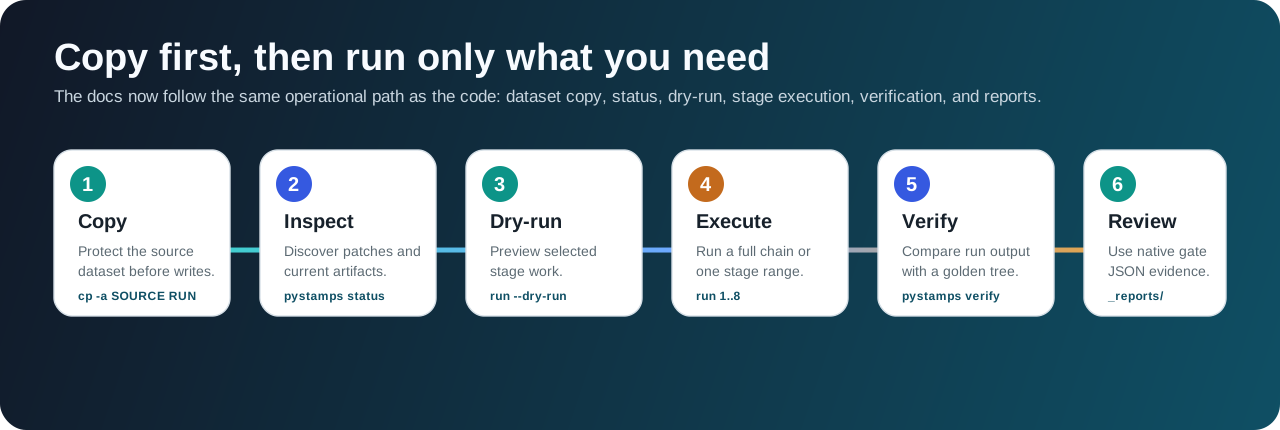
uv run pystamps run --dataset DATASET_DIR --start-step 1 --end-step 8 --io-workers 12 --cpu-workers 4This is the shortest practical path through pySTAMPS. Each command is safe to run on a writable dataset copy and can be narrowed to one stage when you are debugging.
pySTAMPS writes outputs into the dataset tree. Keep the source dataset untouched.
export SOURCE_DATASET=/path/to/original_dataset
export RUN_DATASET=/path/to/run_dataset
rm -rf "$RUN_DATASET"
cp -a "$SOURCE_DATASET" "$RUN_DATASET"These commands do not write stage outputs. Use them to confirm what pySTAMPS sees and what it plans to execute.
uv run pystamps status --dataset "$RUN_DATASET"uv run pystamps run --dataset "$RUN_DATASET" --start-step 1 --end-step 8 --dry-runRun the full pipeline or narrow the stage range while debugging.
uv run pystamps run --dataset "$RUN_DATASET" --start-step 1 --end-step 8uv run pystamps run --dataset "$RUN_DATASET" --start-step 6 --end-step 8Use this when you want the standalone Rust runner instead of the Python wrapper.
cargo build --release -p pystamps-core --bin pystamps-native
target/release/pystamps-native run \
--native-only \
--dataset "$RUN_DATASET" \
--start-step 1 \
--end-step 8 \
--backend native \
--stage2-kernel-backend native \
--cpu-workers 0 \
--stage2-native-threads 0Verification compares your run copy to a reference dataset. The native full-chain gate also records JSON reports for coverage, timings, and parity.
uv run pystamps verify --run /path/to/run_dataset --golden /path/to/reference_dataset
make native-full-chain-verifyuv run pystamps run --dataset DATASET_DIR --start-step 1 --end-step 8 --io-workers 12 --cpu-workers 4runtime:
backend: auto
stage2_kernel_backend: auto
stage2_native_threads: 0
io_workers: 8
cpu_workers: 0
stage7_chunk_ps: 100000
stage8_chunk_edges: 200000
enable_mat_stage_cache: true
stage2_checkpoint_mode: final
stage2_checkpoint_interval: 1Use the copy-first flow above, then read Stages and Code Paths when you need to understand artifacts or narrow execution to one stage.
Short sequence: copy, status, optional --dry-run, stage execution, verify, and native gate reports when needed.