Understand the workflow before you run it.
You do not need to be an interferometry specialist to start using pySTAMPS. You do need a working mental model of what the package reads, what it writes, and why the outputs are organized into stages.
What is pySTAMPS?
pySTAMPS is a Python implementation and orchestration layer for StaMPS-style processing. In practical terms, it reads a dataset directory, checks which processing artifacts already exist, and runs the stages you select.
Install and check the runtime
From a local checkout, use uv and then inspect the registered kernel backends.
git clone git@github.com:sirbastiano/pystamps.git
cd pystamps
uv sync
uv run pystamps describe-backendsEditable pip installs require Rust because the native Rust/CPU extension is compiled locally.
python -m pip install -e .
python -m pip install -e ".[dev]"Minimum concepts in plain language
Interferogram
An interferogram is a derived measurement that compares two radar observations. It stores phase differences, which are useful but not yet easy to interpret physically.
Phase
Phase is a wrapped angular quantity. It repeats, so a raw phase value often needs extra processing before it can be interpreted as a smooth displacement-like signal.
Unwrapping
Unwrapping tries to turn repeating phase cycles into a continuous signal. In pySTAMPS this is one of the later merged stages and may rely on external tools such as snaphu.
Coherence
Coherence is a rough measure of signal stability and reliability. Higher coherence usually means a point is easier to trust during later processing.
Persistent scatterer
A persistent scatterer is a point that remains stable enough across repeated observations to be useful for long-term analysis.
SCLA
SCLA stands for spatially correlated look-angle error. In practice, pySTAMPS estimates and compensates for structured phase components that are not the signal you want to keep.
What a dataset folder looks like
pySTAMPS works on a dataset root. That root usually contains patch directories such as PATCH_1, plus merged-level folders and files such as geo, rslc, or diff0.
/path/to/reference_dataset/
PATCH_1/
PATCH_2/
PATCH_3/
PATCH_4/
geo/
rslc/
diff0/
First commands to learn
- Inspect the dataset layout:
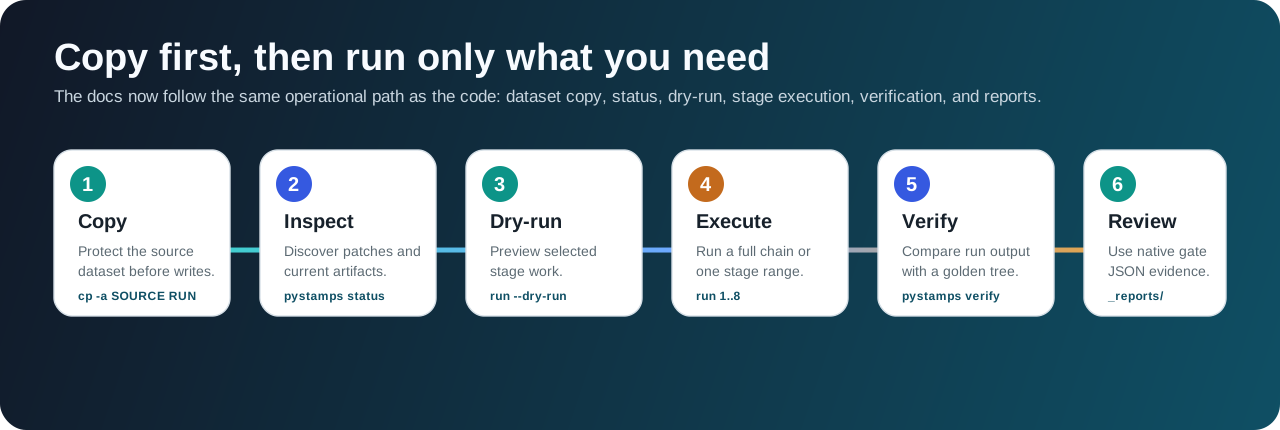
uv run pystamps status --dataset /path/to/run_dataset- Check what a full run would do without writing outputs:
uv run pystamps run --dataset /path/to/run_dataset --start-step 1 --end-step 8 --dry-run- Run a smaller stage range on a copy:
cp -a /path/to/reference_dataset /path/to/run_dataset
uv run pystamps run --dataset /path/to/run_dataset --start-step 6 --end-step 8Prepared datasets often contain prior outputs, so completed stages can report skipped_existing.
Switch to optimized Rust/native kernels
The Python CLI can use native kernels through config.
runtime:
backend: auto
stage2_kernel_backend: native
stage2_native_threads: 0
kernel_backend_overrides:
stage2_grid_accumulate: native
stage2_histogram: native
stage2_topofit: native
stage2_topofit_row_invariant: native
stage2_topofit_coh_row_invariant: native
stage4_edge_stats: native
stage7_scla: native
stage8_edge_noise: native
io_workers: 8
cpu_workers: 0uv run pystamps --config native-kernels.yaml run --dataset /path/to/run_dataset --start-step 2 --end-step 8Use python to force reference kernels and native for compiled Rust/CPU kernels. The stage-2 kernel backend accepts only auto, python, or native.
If the copied dataset already has the expected outputs, the CLI skips those stages. Use a dataset copy that still needs the requested stage outputs, or use benchmark/direct-kernel examples to profile optimized kernels.
uv run pystamps verify --run /path/to/run_dataset --golden /path/to/reference_dataset
make native-full-chain-verifyRun the standalone Rust CLI
Use the native CLI when you want the direct Rust runner.
cargo build --release -p pystamps-core --bin pystamps-native
target/release/pystamps-native run \
--native-only \
--dataset /path/to/run_dataset \
--start-step 1 \
--end-step 8 \
--backend native \
--stage2-kernel-backend native \
--cpu-workers 0 \
--stage2-native-threads 0See Native Rust CLI for coverage, direct stage commands, and full-chain validation.
Execution map
Short sequence: status → optional --dry-run → stage execution → verify.
When to use the repo-specific shortcuts
The repository includes convenience targets such as make test and make audit. Use Verification for output comparison guidance when you move beyond execution-only workflows.