Learn what the pipeline computes and how to run it safely.
This guide joins the scientific concepts behind StaMPS-style persistent-scatterer processing with the pySTAMPS commands used to inspect, execute, accelerate, verify, and benchmark a dataset.
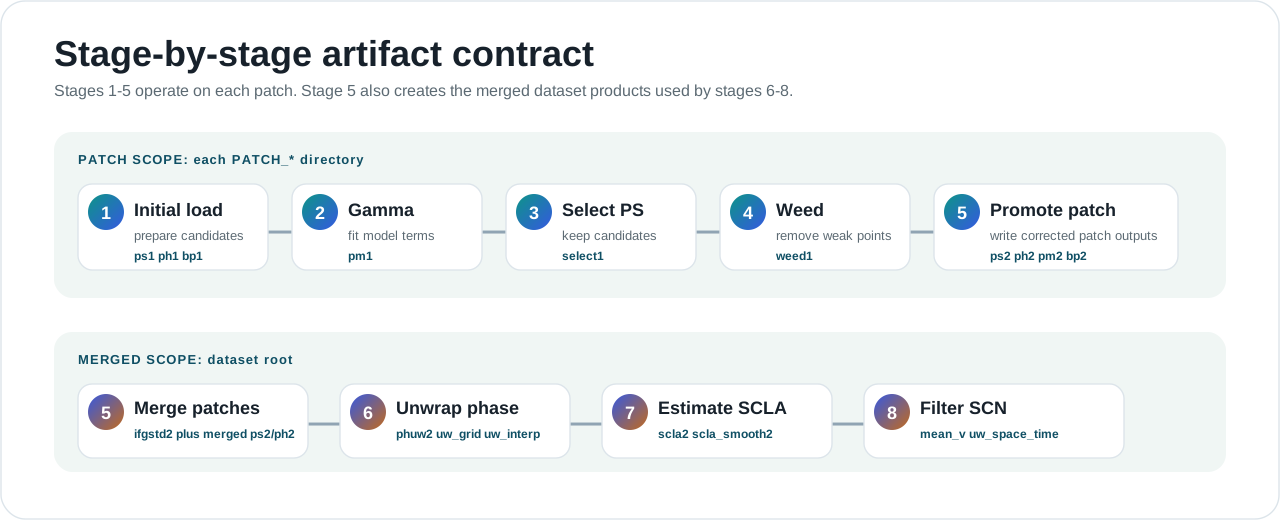
Stage And Artifact Map
The scientific workflow is implemented as an artifact-driven stage chain. Use this map with the detailed Stages and Code Paths page when reading code or debugging a run.
What pySTAMPS is
pySTAMPS is a Python-first runtime for StaMPS-style InSAR processing. It works on a dataset directory, discovers patch folders and stage artifacts, runs selected stages from 1 to 8, and writes new .mat products back into that same tree.
Program role
CLI, Python API, config model, scheduler, kernel registry, and verification tools.
Science role
Persistent-scatterer processing from candidate organization through unwrapping, correction, and filtering.
Migration role
Explicit parity against trusted MATLAB/StaMPS outputs through golden datasets and audit manifests.
Minimum science background
SAR observations
A radar satellite revisits the same area and records complex values whose phase is sensitive to geometry, atmosphere, motion, topography, and noise.
Interferogram
An interferogram compares two radar acquisitions. Single-master workflows compare many slaves to one master; small-baseline workflows organize pairs differently.
Wrapped phase
Radar phase repeats every 2*pi. Unwrapping converts repeating phase cycles into a more continuous estimate.
Persistent scatterer
A point that remains stable across acquisitions and is useful for time-series analysis.
Coherence
A practical reliability signal. Higher coherence usually means a point is easier to trust later.
SCLA
Spatially correlated look-angle error, a structured phase component estimated and corrected in late-stage processing.
Dataset mental model
A pySTAMPS run points at one dataset root. The root usually contains patch directories, optional patch.list, source folders, and merged stage artifacts.
DATASET/
patch.list
PATCH_1/
ps1.mat
ph1.mat
pm1.mat
select1.mat
weed1.mat
PATCH_2/
diff0/
geo/
rslc/
ps2.mat
ph2.mat
phuw2.mat
scla2.mat
uw_space_time.matUse status first:
uv run pystamps status --dataset DATASETArtifact-driven execution
Each stage has expected output artifacts. If the artifact or merged-stage bundle already exists, the pipeline reports skipped_existing instead of recomputing it.
| Status | Meaning |
|---|---|
planned | Dry-run selected the stage but did not execute it. |
completed | Stage executed or strict reference replay copied the expected bundle. |
skipped_existing | Expected artifacts were already present. |
failed | Stage raised an execution error. |
Install and first run
git clone git@github.com:sirbastiano/pystamps.git
cd pystamps
uv sync
uv run pystamps describe-backendsEditable installs compile the native Rust/CPU extension, so source builds require Rust and Cargo.
python -m pip install -e .
python -m pip install -e ".[dev]"
cargo --versionRun on a copy:
cp -a /path/to/source_dataset /path/to/run_dataset
uv run pystamps status --dataset /path/to/run_dataset
uv run pystamps run --dataset /path/to/run_dataset --start-step 1 --end-step 8 --dry-run
uv run pystamps run --dataset /path/to/run_dataset --start-step 1 --end-step 8CLI command map
| Command | Purpose | Typical use |
|---|---|---|
status | Inspect dataset and inferred progress. | First command on any dataset. |
run | Execute or dry-run stages. | Normal processing. |
verify | Compare a run tree against a golden tree. | Trust but verify. |
describe-inputs | Print logical input contracts. | Learning and debugging. |
describe-backends | Print kernel/backend availability. | Backend setup and speed work. |
list-legacy | List StaMPS legacy scripts. | Migration support. |
uv run pystamps describe-inputs --stage all
uv run pystamps describe-inputs --stage 1 --dataset DATASET --patch PATCH_1
uv run pystamps describe-backendsStage-by-stage science and outputs
This table explains the scientific question at each stage. For implementation entrypoints, Rust readiness, and direct stage commands, open Stages and Code Paths.
| Stage | Scope | Science question | Main outputs |
|---|---|---|---|
| 1 | Patch | What candidate points and metadata are available? | ps1.mat, ph1.mat, bp1.mat |
| 2 | Patch | How well does each candidate fit the phase model? | pm1.mat |
| 3 | Patch | Which candidates are good persistent scatterers? | select1.mat |
| 4 | Patch | Which selected points are noisy or redundant? | weed1.mat |
| 5 | Patch and merged | How do patch results become one dataset view? | ph2.mat, ifgstd2.mat |
| 6 | Merged | What is the unwrapped phase estimate? | phuw2.mat, uw_grid.mat, uw_interp.mat |
| 7 | Merged | What slow correction terms should be estimated? | scla2.mat, scla_smooth2.mat |
| 8 | Merged | What are the final filtered space-time products? | mean_v.mat, uw_space_time.mat |
Switch kernel modality
The CLI command stays the same. Switch between reference Python, optimized native Rust/CPU, and optional CUDA providers through config.
runtime:
backend: auto
stage2_kernel_backend: native
stage2_native_threads: 0
kernel_backend_overrides:
stage2_grid_accumulate: native
stage2_histogram: native
stage2_topofit: native
stage2_topofit_row_invariant: native
stage2_topofit_coh_row_invariant: native
stage4_edge_stats: native
stage7_scla: native
stage8_edge_noise: native
io_workers: 8
cpu_workers: 0
stage7_chunk_ps: 100000
stage8_chunk_edges: 200000uv run pystamps --config native-kernels.yaml run \
--dataset /path/to/run_dataset \
--start-step 2 --end-step 8Current optimized kernel names are stage2_grid_accumulate, stage2_histogram, stage2_topofit, stage2_topofit_row_invariant, stage2_topofit_coh_row_invariant, stage4_edge_stats, stage7_scla, and stage8_edge_noise.
Python API examples
from pystamps.status import collect_status
status = collect_status("/path/to/run_dataset")
print(status.merged_stage)
for patch in status.patch_statuses:
print(patch.patch, patch.stage)from pathlib import Path
from pystamps.config import RunConfig
from pystamps.pipeline.stages import run_pipeline
from pystamps.pipeline.types import PipelineContext
context = PipelineContext(
dataset_root=Path("/path/to/run_dataset"),
run_config=RunConfig(),
start_step=6,
end_step=8,
dry_run=False,
)
report = run_pipeline(context)Verify parity and benchmark speed
Use verification or audit evidence for parity claims.
uv run pystamps verify \
--run /path/to/run_dataset \
--golden /path/to/reference_dataset
make auditUse repeatable benchmarks for speed claims.
make benchmark
uv run python scripts/benchmark_backends.py \
--dataset /path/to/reference_dataset \
--start-step 1 --end-step 8 \
--repeat 3 --warmup 1Troubleshooting
- Stage skipped: skipped_existing means expected artifacts already exist. Use a fresh copy that still needs the stage to force execution.
- Native unavailable: run uv run pystamps describe-backends, install Rust, and rebuild the editable environment.
- Unwrapping fails: check triangle and snaphu availability or configure their paths under tools.
- Verification fails: ensure --run and --golden refer to comparable dataset states.
- Audit is slow: full audit processes every dataset in the maintained manifest; use targeted tests during development and audit for release evidence.